

Speed and fit are the same race.
The firm that responds quickly and effectively is usually the one that wins. The challenge is that the data needed to assemble that team. Skills, availability, rates, clearances, lives across several systems, which is what makes the email thread a necessity in the first place.
Same requirement. Same talent pool. Different speed to credible team.
From requirement to proposed team.
Step 1
Drop in the requirement. A JD, an RFP, an email thread, or a form. Team Builder parses roles, skills, dates, locations, rates, and constraints.


Step 2
Lumiere reads your consultants. Skills, certifications, prior engagements, availability, rate, location, languages, clearances. Not keyword matching, a multi-factor read of who would actually be best fitted for the job.
Step 3
Get a ranked team. A primary team plus alternates per role. Each name: match score, reasoning, availability, rate. Override anything, the system learns from your decisions.
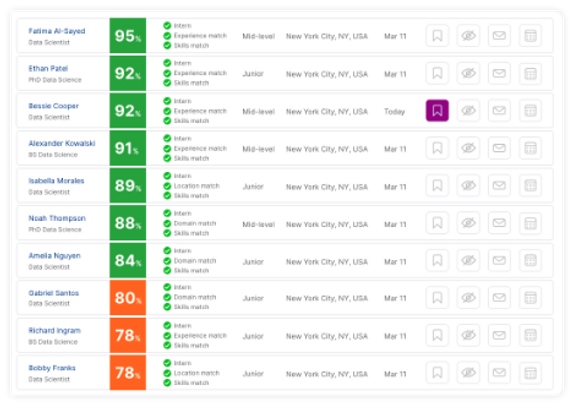
Drill into each candidate with a Match Report, skill scores and named gaps. For unfilled seats, Lumiere drafts a JD to find the candidate in the market.
Send to proposal

Where it earns its keep: complex programs.
A 31-role transformation across regions, three rate tiers, clearances on five seats. Read as one requirement, returned as one coherent team. Not 31 searches stitched together. One read, one team, one shortlist.

Faster than the competitor. Better-matched than the email thread.
On average, customers cut the time from requirement-received to client-ready shortlist by 85%. The match quality, measured by client acceptance and engagement health twelve months in, runs around 67% above the email-thread baseline. Faster proposals, better-suited consultants, fewer engagements that go sideways at month four.
Cost vs coverage. Your call.
Lumiere proposes the optimizations. You decide the trade-off.
Best cost.
The cheapest team that covers most skills. Any partial coverage is named explicitly. The right choice when budget is the binding constraint.
Full coverage, any cost.
Every skill in the requirement covered. Cost lands where it lands. The right choice when the engagement can't tolerate a skill gap.
Anywhere in between.
One slider. Names, costs, and coverage move with it. Every trade-off visible before you commit.

When no internal name fits.
If a role on the project has no qualified consultant on your bench, or if the best match is a 60% match, Lumiere flags the gap, drafts a post-ready JD against your firm's templates, and routes the requirement to your hiring pipeline. The proposal still goes out on time, with the gap addressed proactively.
Project Director

Data Engineer Lead
External
JD Drafting

Sr Data Engineer

Cloud Architect
External
JD Drafting
Complance
